Run CoRE Stack Backend with Docker
Pull the published runtime image and start Postgres, GeoServer, and Django. You do not need Conda, a local Postgres install, or a GitHub password.
The image has the Python/Conda environment and helper scripts only. It does not contain the Django app. Compose bind-mounts your core-stack-backend checkout onto /app, so Django runs the code on your machine. Edit files in that clone; runserver reloads them. You do not rebuild the image for app changes.
For the native Linux installer, see Installer.
What you get
| Service | URL | Login |
|---|---|---|
| Django / API | http://localhost:8000 | Superuser test_user_XXXX / test_change_me (see First start) |
| Django admin | http://localhost:8000/admin/ | Same superuser |
| GeoServer | http://localhost:8080/geoserver | admin / geoserver |
Postgres listens on localhost:5432 (corestack_admin / corestack@123, database corestack_db).
Computing APIs run in-process inside the backend container (CELERY_TASK_ALWAYS_EAGER). You do not start a separate Celery worker.
Requirements
- Docker with Compose v2 (
docker compose version) - About 20 GB free disk (images plus the first-run admin-boundary download, ~8 GB)
- Ports 8000, 8080, and 5432 free on your machine
- Git, to clone core-stack-backend (required: Compose bind-mounts the checkout onto
/app)
The backend and GeoServer images are linux/amd64. Docker Desktop on Apple Silicon runs them with emulation. You do not need extra flags when using docker compose.
1. Clone the repository
A full clone is required. Compose mounts . (the backend directory) onto /app in backend, geoserver-init, and gee-config.
That is the default in docker-compose.yml. To mount a different tree, set BACKEND_CODE_DIR in a .env next to docker-compose.yml (see Optional settings), then recreate:
You do not build the backend image yourself. Pull ghcr.io/core-stack-org/core-stack-backend:latest for Conda, GDAL, and the entrypoint scripts.
2. Optional: Google Earth Engine credentials
The stack starts without GEE. Layer jobs that call Earth Engine need a service-account JSON.
After Django is up, add the account in admin: http://localhost:8000/admin/gee_computing/geeaccount/add/. Use the service-account email from the JSON. Full GEE project steps are in Google Earth Engine.
3. Optional: Google Cloud Storage
Raster publish (GEE → GeoTIFF → GeoServer) needs a GCS bucket. Use the same service account as the GEE JSON. Create the bucket in us-central1 (ee.Image.loadGeoTIFF fails in other regions). Details and IAM notes: Google Cloud Storage.
# Pick a unique bucket name (GCS names are global)
export GCS_BUCKET=your-gcs-bucket
export GEE_SA=name@project-id.iam.gserviceaccount.com

gcloud storage buckets create "gs://${GCS_BUCKET}" --location=us-central1

gcloud storage buckets add-iam-policy-binding "gs://${GCS_BUCKET}" \
  --member="serviceAccount:${GEE_SA}" \
  --role=roles/storage.objectViewer

gcloud storage buckets add-iam-policy-binding "gs://${GCS_BUCKET}" \
  --member="serviceAccount:${GEE_SA}" \
  --role=roles/storage.legacyBucketReader

gcloud storage buckets add-iam-policy-binding "gs://${GCS_BUCKET}" \
  --member="serviceAccount:${GEE_SA}" \
  --role=roles/storage.objectAdmin
Put the bucket name in a .env next to docker-compose.yml:
If Compose is already running:
Skip this section if you only need Django/GeoServer without layer jobs.
4. Pull and start
The image is public (runtime only — no app source):
No docker login is required. On Apple Silicon a plain docker pull of that tag can fail with “no matching manifest for linux/arm64”; Compose already pins linux/amd64.
5. First start
The first docker compose up does extra work. Later starts reuse Docker volumes and skip most of it.
- Admin-boundary data (~8 GB) downloads into the
core_stack_datavolume. This is the slow step. - GeoServer comes up and workspaces/styles are created.
- Django runs migrations, loads seed data, and starts on port 8000.
Watch progress:
GeoServer can take a few minutes. Seed load can also take several minutes.
When Django is ready you will see:
Starting development server at http://0.0.0.0:8000/
Django is ready. Superuser password is test_change_me
The superuser name is test_user_ plus four digits. Find it with:
Change that password after first login. Admin: http://localhost:8000/admin/
Create your own superuser
The test_user_XXXX account is only for first login. Create a named admin when Django is running:
You will be prompted for username, email, and password. Log in at http://localhost:8000/admin/ with that account.
To reset the installer test user’s password back to test_change_me, recreate the backend container (docker compose up -d --force-recreate backend). First start always resets that test user.
6. Check that it is running
curl -s -o /dev/null -w "%{http_code}\n" http://localhost:8000/
curl -s -o /dev/null -w "%{http_code}\n" http://localhost:8000/admin/login/
curl -s -o /dev/null -w "%{http_code}\n" http://localhost:8080/geoserver/web/
Expect 200 from Django and 200 or 302 from GeoServer.
Log in and invoke APIs
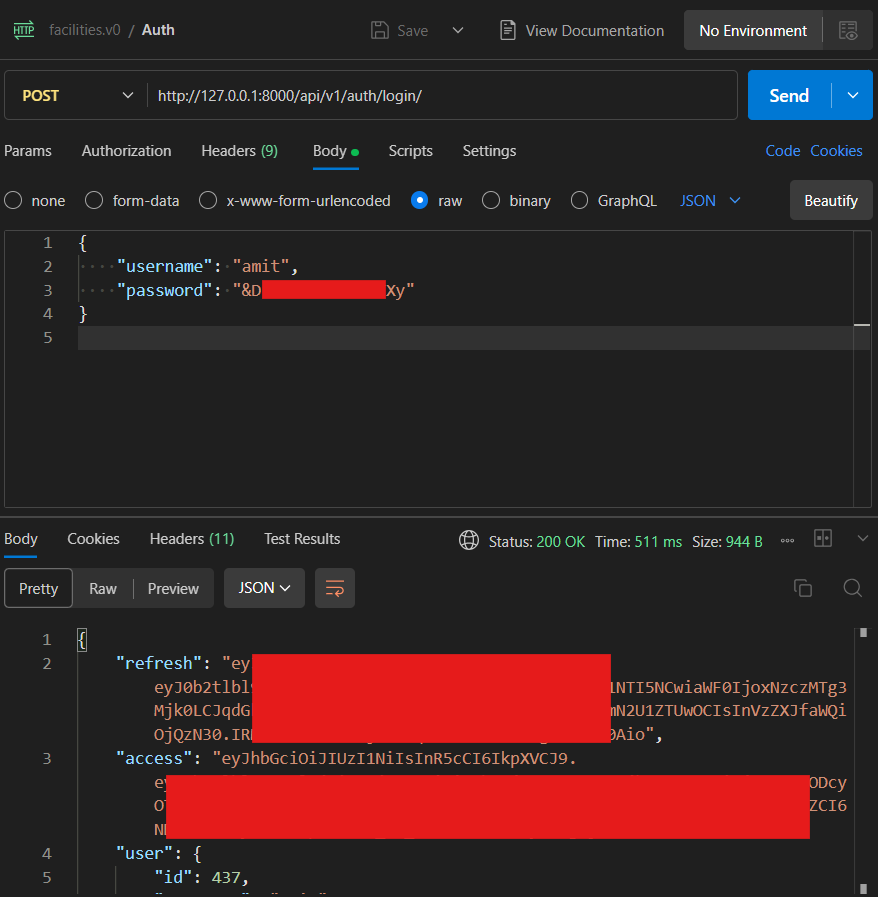
Computing APIs use JWT bearer tokens, not the Django admin session. Base URL: http://127.0.0.1:8000.
1. Log in (JWT)
curl -s -X POST http://127.0.0.1:8000/api/v1/auth/login/ \
  -H "Content-Type: application/json" \
  -d '{"username":"test_user_XXXX","password":"test_change_me"}'
Replace test_user_XXXX with the name from the backend logs. The response includes access (use on API calls), refresh, and user.
2. Get gee_account_id
Most computing POST bodies need a gee_account_id. List configured Earth Engine accounts (requires a valid JWT):
Use the numeric id from the response. If the list is empty, complete GEE credentials and add the account in Django admin. See Google Earth Engine.
3. Call a computing API
The backend container runs compute tasks in-process. Example:
curl -X POST http://127.0.0.1:8000/api/v1/lulc_for_tehsil/ \
  -H "Authorization: Bearer <access-token>" \
  -H "Content-Type: application/json" \
  -d '{
    "state": "karnataka",
    "district": "raichur",
    "block": "devadurga",
    "start_year": 2022,
    "end_year": 2023,
    "gee_account_id": 1
  }'
More routes: Computing API Endpoints and First computing API test-run. Auth errors: API Errors.
4. Postman
Import from this docs repository:
| Asset | File |
|---|---|
| Collection | core-stack-api.postman_collection.json |
| Environment (Docker) | core-stack-docker.postman_environment.json |
Run requests in order:
| Order | Request | Purpose |
|---|---|---|
| 1 | Auth — Login | POST /api/v1/auth/login/ → saves JWT access |
| 2 | GEE — List accounts | GET /api/v1/geeaccounts/ → read gee_account_id |
| 3 | Computing — LULC for tehsil | Sample POST |
Optional GCS setup for raster publication: Google Cloud Storage.
Day-to-day commands
docker compose ps          # status
docker compose logs -f     # all services
docker compose stop        # stop, keep data
docker compose start       # start again
docker compose down        # remove containers, keep volumes
docker compose pull && docker compose up -d   # update the runtime image (not app code)
App edits on the host are what Django runs. Recreate the backend container only if you change Compose mounts or .env:
Wipe the database, GeoServer data, and admin-boundary download (you will re-download ~8 GB next start):
Optional settings
Create a .env next to docker-compose.yml if you need to change ports, passwords, or GCP settings:
BACKEND_PORT=8000
GEOSERVER_PORT=8080
POSTGRES_PORT=5432
POSTGRES_DB=corestack_db
POSTGRES_USER=corestack_admin
POSTGRES_PASSWORD=corestack@123
GEOSERVER_USERNAME=admin
GEOSERVER_PASSWORD=geoserver
GEOSERVER_URL=http://geoserver:8080/geoserver/
GCS_BUCKET_NAME=your-gcs-bucket
GEE_STORAGE_PROJECT=ee-your-project
GEE_STORAGE_PROJECT_HELPER=ee-your-helper-project
# Optional; defaults to this checkout (.)
# BACKEND_CODE_DIR=/path/to/other/checkout
GEOSERVER_URL defaults to the Compose GeoServer service. GEE_STORAGE_PROJECT defaults to project_id in gee_confs/gee-service-account.json when unset. BACKEND_CODE_DIR defaults to . (the backend repository).
Force a fresh admin-boundary download:
Troubleshooting
Port already in use
Stop whatever is bound to 8000, 8080, or 5432, or set BACKEND_PORT / GEOSERVER_PORT / POSTGRES_PORT in .env.
denied or unauthorized pulling the image
The package should be public. Confirm you can open ghcr.io/core-stack-org/core-stack-backend without signing in. Then retry docker compose pull.
no matching manifest for linux/arm64
Use Compose (docker compose pull), not a bare docker pull on Apple Silicon. Compose sets platform: linux/amd64.
Backend keeps restarting
docker compose logs backend. Common first-run waits: GeoServer health, the 8 GB download, or seed load.
manage.py not found / empty /app
The image has no app source. You must start Compose from a clone of core-stack-backend (or set BACKEND_CODE_DIR to one). Recreate after changing the mount:
GEE jobs fail after a successful start
Mount the JSON under gee_confs/gee-service-account.json and add the account in Django admin. Restart is not required for the file mount if the directory already existed; recreate the backend container if you added the file later:
More setup fixes: Setup Troubleshooting.