Installer
Choose how you want to run the backend:
- Native (Linux) — this page. Uses the backend installer on Ubuntu or WSL2. It sets up Python, PostgreSQL, RabbitMQ, the runtime
.env, migrations, seed data, optional Earth Engine credentials, admin-boundary data, and the built-in initialization check. - Docker — Docker installation. Pulls the published runtime image and bind-mounts the backend checkout onto
/app. No Conda, local Postgres, or GitHub password.
Optional integrations (GEE, GCS, GeoServer) are Steps 4–6 below. Installer flags and troubleshooting are documented at the bottom of this page.
Installation
The Native tab uses installation/install.sh in core-stack-backend. The Docker tab uses docker compose and does not run that installer.
| Step | What you do |
|---|---|
| 1 | Prerequisites |
| 2 | Clone the backend repository |
| 3 | Provision the runtime — native full install, or see the Docker tab |
| 4 | GEE service account JSON key (optional) |
| 5 | GCS bucket (optional) |
| 6 | GeoServer (optional) |
| 7 | Data paths in nrm_app/.env |
| 8 | Start the runtime |
| 9 | Log in and invoke APIs (shared below) |
Step 1 — Prerequisites
- Ubuntu or another Linux environment. On Windows, use WSL2.
sudoaccess, internet access, Git.- Enough disk space for dependencies and the admin-boundary dataset.
Step 2 — Clone the backend repository
Step 3 — Provision the runtime
Run the full backend installer from the repo root:
This creates the conda env, PostgreSQL, RabbitMQ, nrm_app/.env, migrations, seed data, the installer test user (superuser step), and optional integrations if you pass flags (for example --gee-json).
Review nrm_app/.env after the run. Do not create a competing repo-root .env.
Step 4 — GEE service account JSON key
Skip if you already passed --gee-json during Step 3.
- Create and download a Google Cloud service account JSON key with Earth Engine access.
- Import it into the backend:
bash installation/install.sh \
  --only gee_configuration \
  --gee-json /full/path/to/service-account.json
Step 5 — GCS bucket
Skip if you do not need GEE-backed raster publication yet.
Create a bucket in us-central1 and grant IAM to the same service account as Step 4. See Google Cloud Storage — bucket setup and Required IAM.
bash installation/install.sh \
  --only gcs_bucket_configuration \
  --input gcs_bucket_name=your-gcs-bucket
Step 6 — GeoServer
Skip if GeoServer was configured during Step 3. Otherwise register your instance:
bash installation/install.sh \
  --only initialisation_check \
  --input geoserver_url=https://host/geoserver \
  --input geoserver_username=admin \
  --input geoserver_password=your-password
Step 7 — Data paths in nrm_app/.env
The installer sets paths in nrm_app/.env. Confirm they match your layout:
DATA_DIR— source and working data used by pipelines (inputs to generate other layers).EXCEL_DIR/EXCEL_PATH— exported spreadsheet outputs.
On native Linux these usually sit under the backend tree (for example $BACKEND_DIR/data/...). Only edit nrm_app/.env if the installer defaults are wrong for your machine.
Step 8 — Start the runtime
From core-stack-backend, use two terminals.
Terminal 1 — Django:
Terminal 2 — Celery (required for computing APIs):
Access (native):
| Service | URL |
|---|---|
| API / docs | http://127.0.0.1:8000/ |
| Django admin | http://127.0.0.1:8000/admin/ |
Django admin can use the same installer test user as the API, or run python manage.py createsuperuser for a separate admin account.
Pull the published runtime image and start Postgres, GeoServer, and Django. You do not need Conda, a local Postgres install, or a GitHub password. The image does not include the Django app; Compose bind-mounts this checkout onto /app. Full walkthrough: Docker installation.
What you get
| Service | URL | Login |
|---|---|---|
| Django / API | http://localhost:8000 | Superuser test_user_XXXX / test_change_me |
| Django admin | http://localhost:8000/admin/ | Same superuser |
| GeoServer | http://localhost:8080/geoserver | admin / geoserver |
Postgres listens on localhost:5432 (corestack_admin / corestack@123, database corestack_db). Computing APIs run in-process; you do not start a separate Celery worker.
Step 1 — Prerequisites
- Docker with Compose v2 (
docker compose version) - About 20 GB free disk (images plus the first-run admin-boundary download, ~8 GB)
- Ports 8000, 8080, and 5432 free
- Git, to clone the backend repo (required: Compose bind-mounts the checkout onto
/app)
The backend and GeoServer images are linux/amd64. Docker Desktop on Apple Silicon runs them with emulation.
Step 2 — Clone the backend repository
A full clone is required. Compose mounts . onto /app in backend, geoserver-init, and gee-config. To use another tree, set BACKEND_CODE_DIR in a .env next to docker-compose.yml. You do not build the backend image yourself.
Step 3 — Provision the runtime
Optional: mount a GEE service-account JSON if layer jobs will call Earth Engine.
Pull and start:
The image is public (runtime only — no app source): ghcr.io/core-stack-org/core-stack-backend:latest. No docker login is required. On Apple Silicon use Compose, not a bare docker pull (Compose pins linux/amd64).
The first start downloads admin-boundary data (~8 GB), creates GeoServer workspaces/styles, runs migrations, and loads seed data. Watch progress:
When Django is ready:
Starting development server at http://0.0.0.0:8000/
Django is ready. Superuser password is test_change_me
The superuser name is test_user_ plus four digits:
Change that password after first login.
Step 4 — GEE service account JSON key
Skip if you do not need Earth Engine. After Django is up, add the account at http://localhost:8000/admin/gee_computing/geeaccount/add/. Use the service-account email from the JSON you mounted in gee_confs/. Full GEE project steps: Google Earth Engine.
If you added the JSON after the first start:
Step 5 — GCS bucket
Skip if you do not need GEE-backed raster publication yet. Create a bucket in us-central1 and grant the GEE service account roles/storage.objectViewer, roles/storage.legacyBucketReader, and roles/storage.objectAdmin. Put the name in a Compose .env as GCS_BUCKET_NAME=your-gcs-bucket, then docker compose up -d --force-recreate gee-config backend. Full walkthrough: Docker installation — GCS and Google Cloud Storage.
Step 6 — GeoServer
Compose starts GeoServer and initializes workspaces/styles. Default login is admin / geoserver at http://localhost:8080/geoserver. Nothing else to run.
Step 7 — Data paths
App code is the host checkout bind-mounted at /app. Data lives on the core_stack_data Docker volume (DATA_DIR=/var/tmp/core-stack-data inside the container). After first start, nrm_app/.env is written on the mounted tree (the host clone).
Step 8 — Start the runtime
docker compose up -d already starts Django. Confirm:
curl -s -o /dev/null -w "%{http_code}\n" http://localhost:8000/
curl -s -o /dev/null -w "%{http_code}\n" http://localhost:8000/admin/login/
curl -s -o /dev/null -w "%{http_code}\n" http://localhost:8080/geoserver/web/
Expect 200 from Django and 200 or 302 from GeoServer.
Access (Docker on host):
| Service | URL |
|---|---|
| API / docs | http://127.0.0.1:8000/ |
| Django admin | http://127.0.0.1:8000/admin/ |
| GeoServer admin | http://127.0.0.1:8080/geoserver |
Day-to-day commands, optional ports/passwords, and troubleshooting: Docker installation.
Create a named Django admin (optional):
Step 9 — Log in and invoke APIs
Same flow for native and Docker. Computing APIs use JWT bearer tokens, not the Django admin session. Both installs use http://127.0.0.1:8000 as the API base URL.
1. Test user
Native: created by the superuser installer step. To recreate:
Docker: created on first start. Find the username in docker compose logs backend.
Note the username test_user_XXXX and password test_change_me.
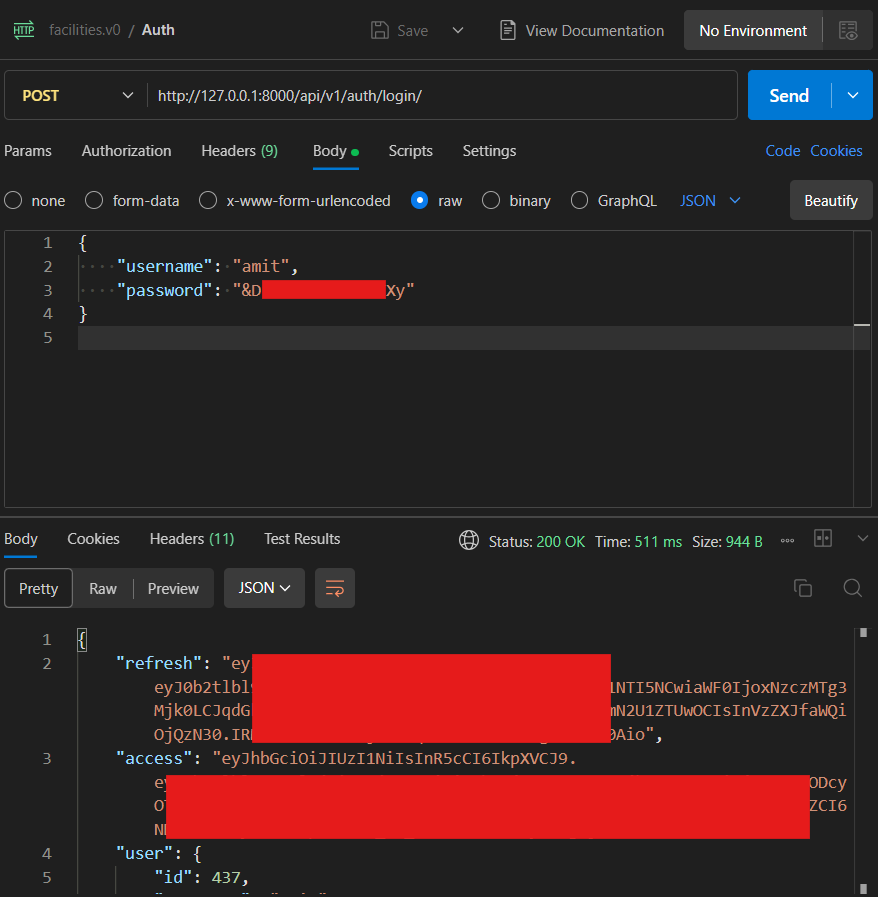
2. Log in (JWT)
curl -s -X POST http://127.0.0.1:8000/api/v1/auth/login/ \
  -H "Content-Type: application/json" \
  -d '{"username":"test_user_4272","password":"test_change_me"}'
The response includes access (use on API calls), refresh, and user.
3. Get gee_account_id
Most computing POST bodies need a gee_account_id. List configured Earth Engine accounts (requires a valid JWT from step 2):
Use the numeric id from the response. If the list is empty, complete Step 4 in the Native or Docker tab above, or see Google Earth Engine.
4. Call a computing API
Native: keep Django and Celery running (Step 8). Docker: compute runs in-process in the backend container; no separate Celery worker.
Example:
curl -X POST http://127.0.0.1:8000/api/v1/lulc_for_tehsil/ \
  -H "Authorization: Bearer <access-token>" \
  -H "Content-Type: application/json" \
  -d '{
    "state": "karnataka",
    "district": "raichur",
    "block": "devadurga",
    "start_year": 2022,
    "end_year": 2023,
    "gee_account_id": 1
  }'
More routes: Computing API Endpoints and First computing API test-run. Auth errors: API Errors.
5. Postman
Import from this docs repository:
| Asset | File |
|---|---|
| Collection | core-stack-api.postman_collection.json |
| Environment (native) | core-stack-local.postman_environment.json |
| Environment (Docker) | core-stack-docker.postman_environment.json |
Run requests in order:
| Order | Request | Purpose |
|---|---|---|
| 1 | Auth — Login | POST /api/v1/auth/login/ → saves JWT access |
| 2 | GEE — List accounts | GET /api/v1/geeaccounts/ → read gee_account_id |
| 3 | Computing — LULC for tehsil | Sample POST; native needs Celery on queue nrm |
Useful installer controls
# Show exact step names
bash installation/install.sh --list-steps

# Rebuild only nrm_app/.env
bash installation/install.sh --only env_file

# Rerun only backend validation
bash installation/install.sh --only initialisation_check

# Add Earth Engine credentials later
bash installation/install.sh \
  --only gee_configuration,initialisation_check \
  --gee-json /full/path/to/service-account.json

# Add GeoServer values later and validate
bash installation/install.sh \
  --only initialisation_check \
  --input geoserver_url=https://host/geoserver \
  --input geoserver_username=admin \
  --input geoserver_password=your-password

# Rerun the public API smoke test
bash installation/install.sh \
  --only public_api_check \
  --input public_api_key=your-public-api-key
Use --only for the smallest safe rerun. Use --from STEP when you deliberately want to rerun a step and everything after it.
Optional inputs
The installer currently accepts:
gee_jsonpublic_api_keypublic_api_base_urlgeoserver_urlgeoserver_usernamegeoserver_password
--gee-json PATH is a shortcut for --input gee_json=PATH.
After install
- Read the Backend Code Map.
- Complete Step 9 — Log in and invoke APIs if you have not already.
- For integration deep-dives: Integrations (GEE, GCS, GeoServer).
- Use Troubleshooting when the installer or runtime names a failing step. Docker Compose issues are on Docker installation.